For Claude Code, Codex CLI, GitHub Copilot CLI and Kiro CLI
Explain any text in your coding agent's terminal
Select words in your agent's answer and press Alt+P. A short explanation opens right under them. Esc closes it, and the screen is exactly as before.
Free and open source. No account and no API key: peekme uses your agent's own login. On a Mac the keys are Option+P and Option+Shift+P.
What it does
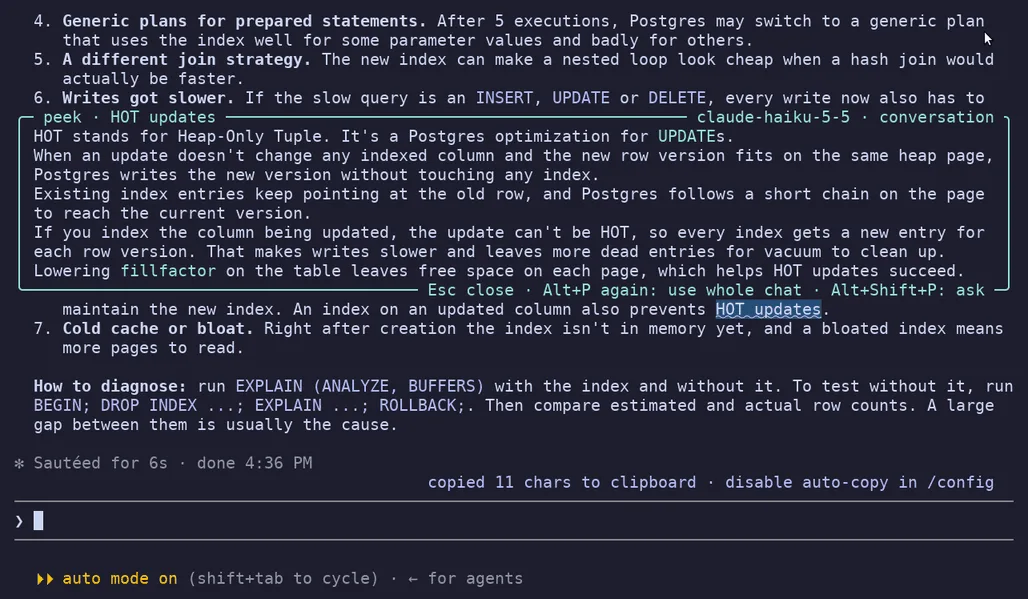
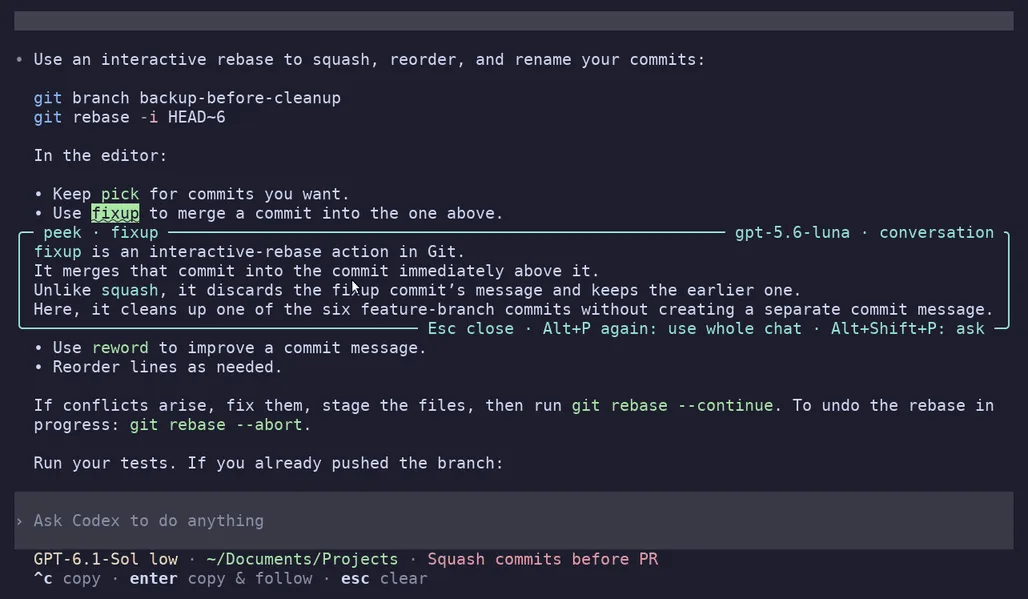
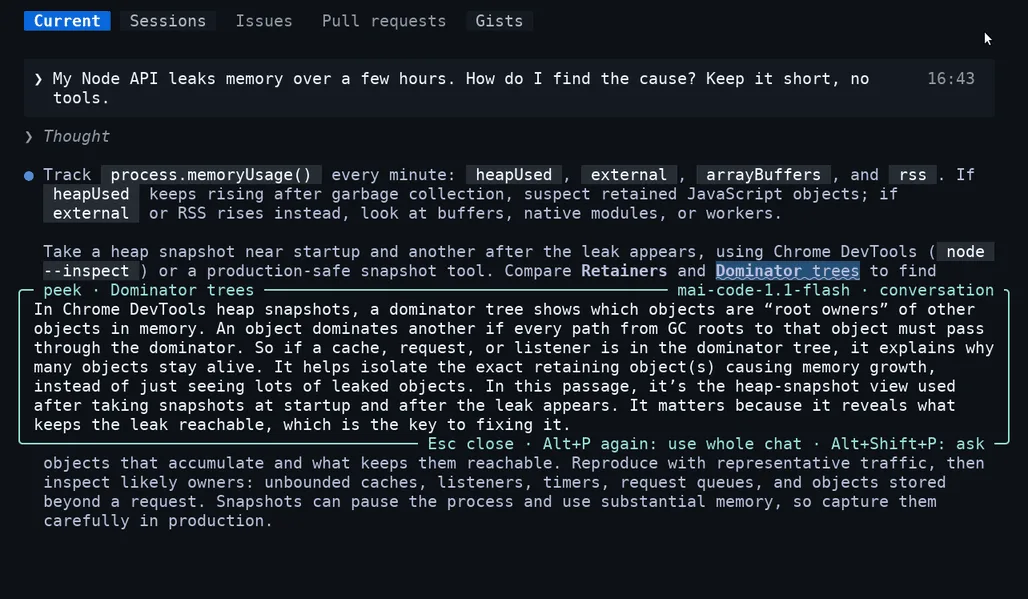
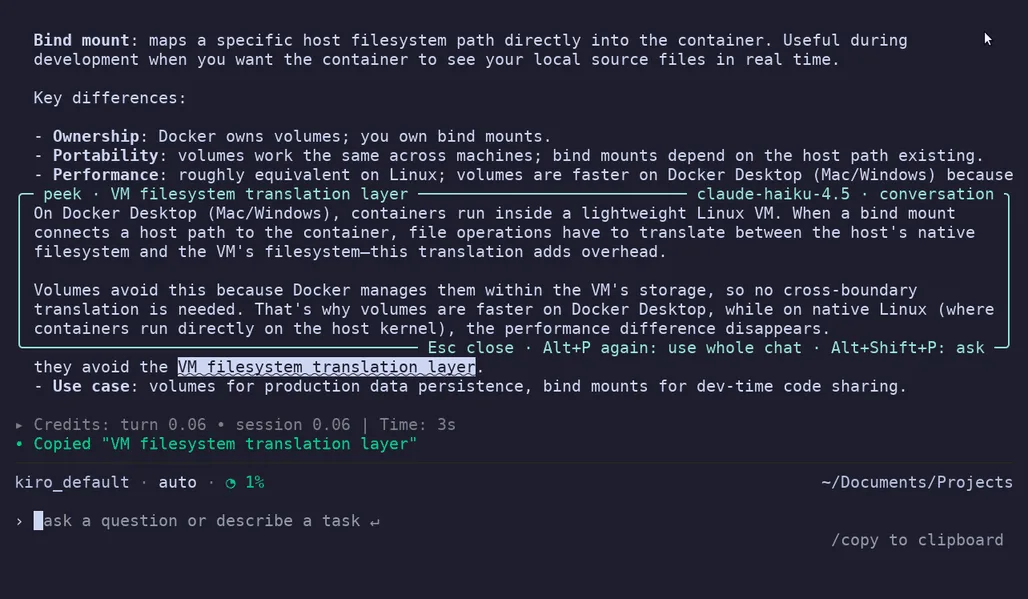
Peek: Alt+P
Select text and press Alt+P. A small, fast model explains it in a few lines, under the text you selected. The other lines move down to make room, like Peek in VS Code. The model knows the conversation: select "its split panes" in an answer that recommends Kitty, and it tells you about Kitty.
Ask, and boxes inside boxes
Alt+Shift+P opens the box empty, and you type your own question, for example "what value should I set it to?". The model your chat runs on answers it, with the whole conversation. Select words inside a box and press Alt+P or Alt+Shift+P again: a new box opens inside it, under that line. You can go several levels deep.
Saved answers
Text you asked about gets a dotted underline. Click it later and the answer opens again at once, with no new request. A second click closes it.
Same keys in four agents
You install peekme once. The keys and the boxes are the same in every agent, and an agent you install later gets peekme too.
Already have /btw?
Claude Code has /btw, Codex has /side, Copilot CLI has /ask. They are good for a question about the work. peekme is for the words in front of you. You don't type or copy the term, the answer opens right next to it, a box can open inside a box, and the answer stays on the screen as an underline. The two work well together.
Install
npm i -g peekme
peekme install
brew install gregorybolshakov/tap/peekme
peekme installcurl -LsSf https://github.com/GregoryBolshakov/peekme/releases/latest/download/peekme-installer.sh | sh
peekme installcargo install peekme
peekme installOpen a new terminal and start your agent as always: claude, codex, copilot or kiro-cli. That's all. peekme doctor checks the setup and peekme uninstall removes it. Install details
Where it works
Linux and macOS, x86_64 and ARM. Any terminal app, also inside tmux and over SSH. On Wayland through XWayland. Not on Windows yet.
What it costs
Nothing extra to buy. Explanations go through your agent's own login and use a little of your plan each time. Nothing starts before the first Alt+P.
What it sends
The selected words and a few KB of the conversation around them, to the same model provider your agent already uses. There is no peekme server. Privacy
Questions
Does it change my agent?
No. peekme starts your agent in a pseudo-terminal and passes everything through unchanged. It only draws its box over a few rows while the box is open. Run command claude to start plain Claude Code once (the same for the other agents), and peekme uninstall to remove peekme.
Which model explains?
A peek uses a small, fast model through your agent: Haiku in Claude Code, the model your Codex account lists as fast, Copilot's Auto, and claude-haiku-4.5 in Kiro. A typed question uses the model your chat runs on. Both can be changed, see Settings.
How fast is it?
The answer starts to appear after about 1 to 2 seconds. A typed question goes to a bigger model with the whole conversation, so it takes longer.
Do I need to change terminal settings on a Mac?
No. Option+P works as it is, also over SSH and inside tmux. A Mac terminal types π for Option+P, and peekme takes it as the shortcut only when text is selected. More about macOS
What if the explanation is not enough?
Press Alt+P again while the box is open. The model then gets the whole conversation instead of the parts around the selection. For a long chat peekme shows the size first and sends it only after one more Alt+P.
Can I select text that scrolled away?
Not yet. peekme explains text that is on the screen now.
Can I use it with another program?
Yes, run peekme -- COMMAND. The explanations need one of the four agents' logins.